
The macOS aesthetic comes to the web! Introducing the new layout variants in tucu-ui
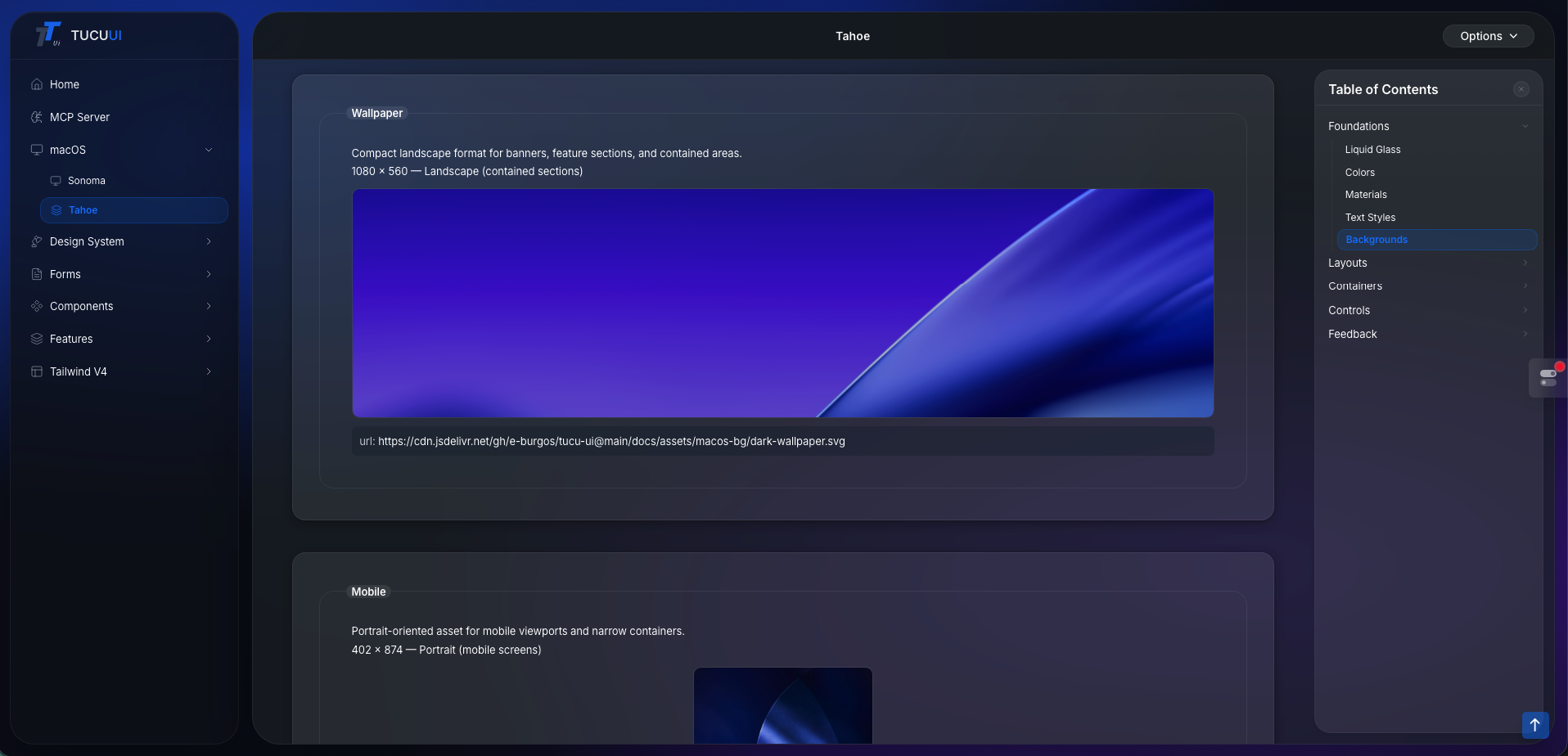
The macOS aesthetic comes to the web! Introducing the new layout variants in tucu-ui
Today is a very special day for me. If you've been following me for a while, you know how passionate I am about interface design and user experience. That's why I've been working hard on my component library, tucu-ui, and today I can finally show you something I've poured a lot of love into: the new macOS-inspired layout variants! 🍏✨
If you want to see them in action right away, I invite you to check out the link here: tucu-ui macOS Layouts.
Why macOS? 🤔
The Apple ecosystem has always stood out for its clean design, smart use of space, and highly intuitive navigation. I wanted to bring that same sense of fluidity and professionalism to the web, allowing any developer to replicate this aesthetic in their applications quickly and hassle-free.
With these new layouts, your web application can transform into a modern "desktop app" in a matter of minutes. Perfect for SaaS, dashboards, or personal portfolios!
What will you find in this update? 🚀
I have designed different variants to adapt to whatever your project needs, taking care of every visual detail:
- Classic macOS Sidebar: A sleek sidebar menu with navigation support, perfect for admin panels or complex tools.
- Windows with Native Controls: The iconic red, yellow, and green buttons (the macOS traffic light) interactively integrated to give that real "app window" feel.
- Premium Aesthetic: Soft shadows (box-shadows), perfect rounded corners, and subtle transitions that instantly elevate the design.
A quick look at how to use it 💻
Integrating it into your project is super simple and minimalist. Here is an example of what the basic structure looks like:
import { ThemeProvider, LAYOUT_OPTIONS, LucideIcons } from '@e-burgos/tucu-ui';
import { Dashboard } from './pages/Dashboard';
import { Projects } from './pages/Projects';
import { Analytics } from './pages/Analytics';

const menuItems = [
  {
    name: 'Dashboard',
    path: '/',
    icon: <LucideIcons.LayoutDashboard />,
    component: <Dashboard />,
  },
  {
    name: 'Projects',
    path: '/projects',
    icon: <LucideIcons.FolderKanban />,
    component: <Projects />,
  },
  {
    name: 'Analytics',
    path: '/analytics',
    icon: <LucideIcons.BarChart3 />,
    component: <Analytics />,
  },
];

function App() {
  return (
    <ThemeProvider
      menuItems={menuItems}
      layout={LAYOUT_OPTIONS.MACOS_TAHOE}
      themeStyle="macos-tahoe" // Activates Tahoe theme + Liquid Glass
      logo={{ path: '/', name: 'Studio' }}
      rightButton={<NotificationBell />}
    />
  );
}

// Features:
// - Liquid Glass sidebar with backdrop-blur and vibrancy
// - Refined toolbar with centered page title
// - Dynamic mesh background (radial variant by default)
// - 9 Tahoe Accent Bundles (Glass, Blue, Purple, Pink, etc.)
// - Content area with rounded corners and glass surface
// - Toast notifications with Tahoe styling
I'd love to hear your thoughts! 💬
I build this project entirely on my own, always keeping the developer community in mind. If you are looking for a fresh, minimalist, and professional look for your next project, I invite you to try out tucu-ui.
- 👉 Explore the documentation and play with the demos: tucu-ui.netlify.app/macos
- ⭐️ If you like the project, feedback, a repost, or a star on the repository helps me a lot to keep improving it!
What do you think of this style for web applications? Are you someone who prefers traditional layouts, or do you like to experiment with operating system aesthetics? Let me know in the comments! 👇
#React #Frontend #UIUX #WebDesign #OpenSource #TailwindCSS
Comments
Be the first to comment.